# The authoring GUI
> **Section:** [Guides](https://transcodeworks.github.io/guides.md)
> **Related:** [Annotations](https://transcodeworks.github.io/guides/annotations.md) · [Configuration](https://transcodeworks.github.io/guides/configuration.md) · [Next.js and other hosts](https://transcodeworks.github.io/guides/hosts.md) · [Agents (MCP)](https://transcodeworks.github.io/guides/mcp.md) · [Scenes and shots](https://transcodeworks.github.io/guides/scenes.md) · [Guided tours](https://transcodeworks.github.io/guides/tours.md)
> **Also:** [HTML version](https://transcodeworks.github.io/guides/authoring) · [Docs index](https://transcodeworks.github.io/llms.txt)
---
```bash
stillsmith dev
```
| | |
| --- | --- |
| Authoring GUI | `http://localhost:5173/__stillsmith/author` |
| Scene browser | `http://localhost:5173/__stillsmith/` |
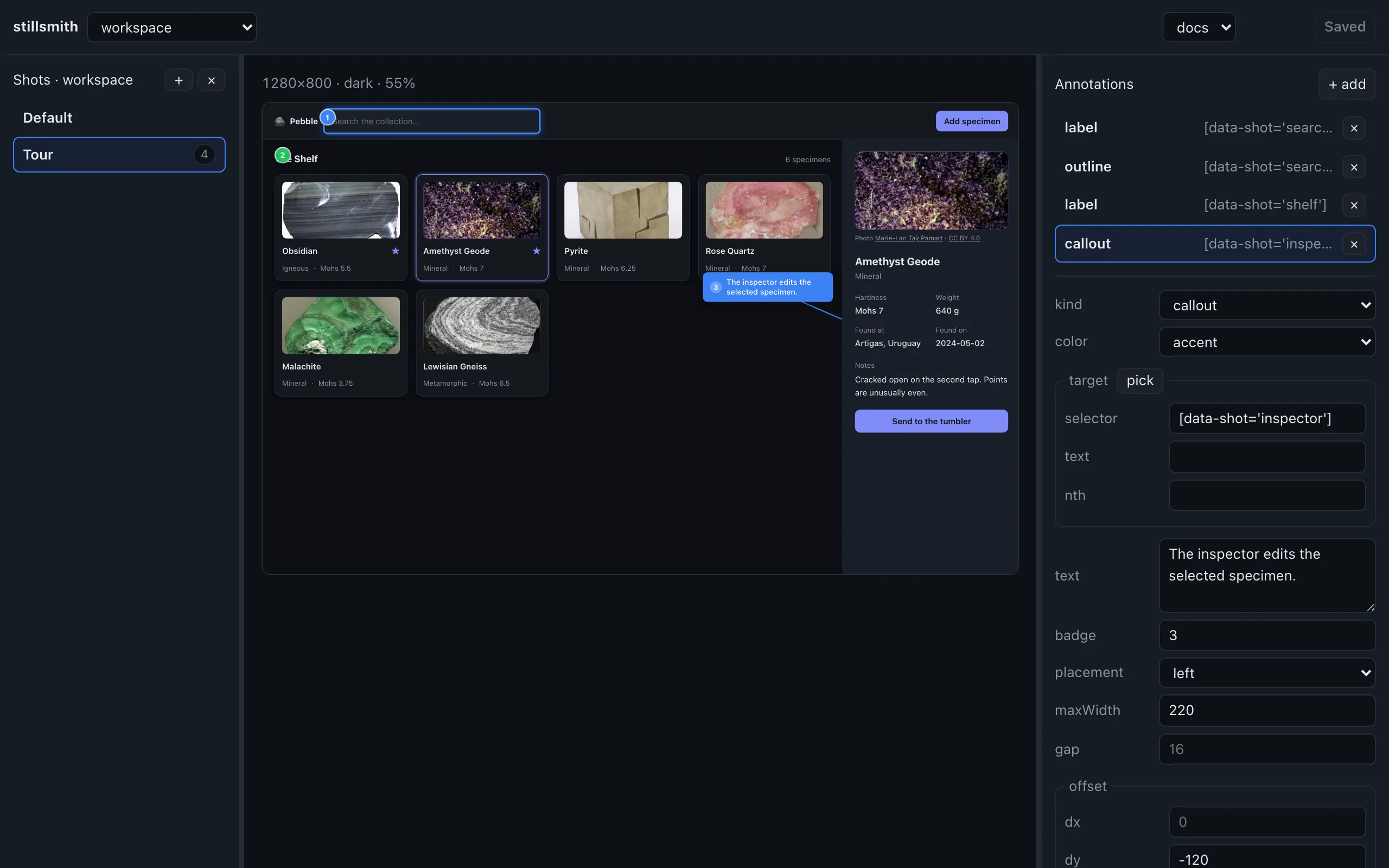
## The loop
Pick a scene, a shot, and a preset. The scene renders live in an iframe at the
preset's true pixel size, scaled down to fit but never reflowed, so what you see
is the layout that will ship.
Add an annotation, hit **pick**, then click the element you mean. stillsmith infers
the most robust target it can and tells you how good it is:
| Quality | Meaning |
| --- | --- |
| `stable` | A `data-shot`, a stable id, or a `data-testid`. Survives re-renders and preset changes. |
| `ok` | Matched by text. Works, but add a `data-shot`. |
| `brittle` | An absolute rect. Will break the moment anything moves. |
It deliberately skips framework-generated ids (React's `useId`, react-aria). They
look like stable selectors but change on every render, so an annotation built on
one would silently fail to resolve at capture time.
## Drag to position
Every annotation is grabbable right in the preview, and the cursor turns into a
grab handle over anything you can move. Pick up an outline box, a highlight, a
callout, a numbered label, or an arrowhead and drop it where you want it. The drag
writes straight into that annotation's
[`offset`](./annotations/#adjusting-placement-with-offset), the same
`{ dx, dy }` you could type into the fields by hand, and each kind moves the same
thing it moves for a typed offset.
The offset panel updates live as you drag, so you can grab an annotation to get
close and then nudge the last pixel or two by keyboard.
## The preview is not a mock
It runs the same drawing engine against the iframe's document that runs against
the page at capture time, so what you nudge here is what comes out of the shot.
There's no second implementation to drift.
## Save writes TypeScript
Saving edits your `.scene.tsx` in place:
```diff
{
kind: "callout",
target: { selector: "[data-shot='inspector']" },
text: "The inspector edits the selected specimen.",
placement: "left",
- offset: { dy: -120 },
+ offset: { dy: -64 },
},
```
That's the whole diff from nudging a callout in the GUI. stillsmith edits only the
properties you changed, prints them compactly, and runs your formatter (Biome or
Prettier), so a visual tweak produces a diff a reviewer can read rather than a
reformatted file.